Is Suno Pro Worth It? A Value Analysis of Lossless WAV, Downloads, and Priority
Pro's core perks: lossless WAV, clearer licensing, and priority. Plan-by-plan ROI for $8 and $24 tiers with breakeven scenarios.
The Four Things Pro Actually Gives You
After a few free tracks on Suno, the question shows up on its own: is $8 (or $24) a month actually worth it? The pricing page sells the upgrade in marketing copy, which doesn't help much. This article breaks down the four concrete rights Suno Pro adds on top of free, attaches real numbers to each, and walks through which usage patterns actually pay back the subscription. Prices and policy reflect what's live as of the March 26, 2026 revision.
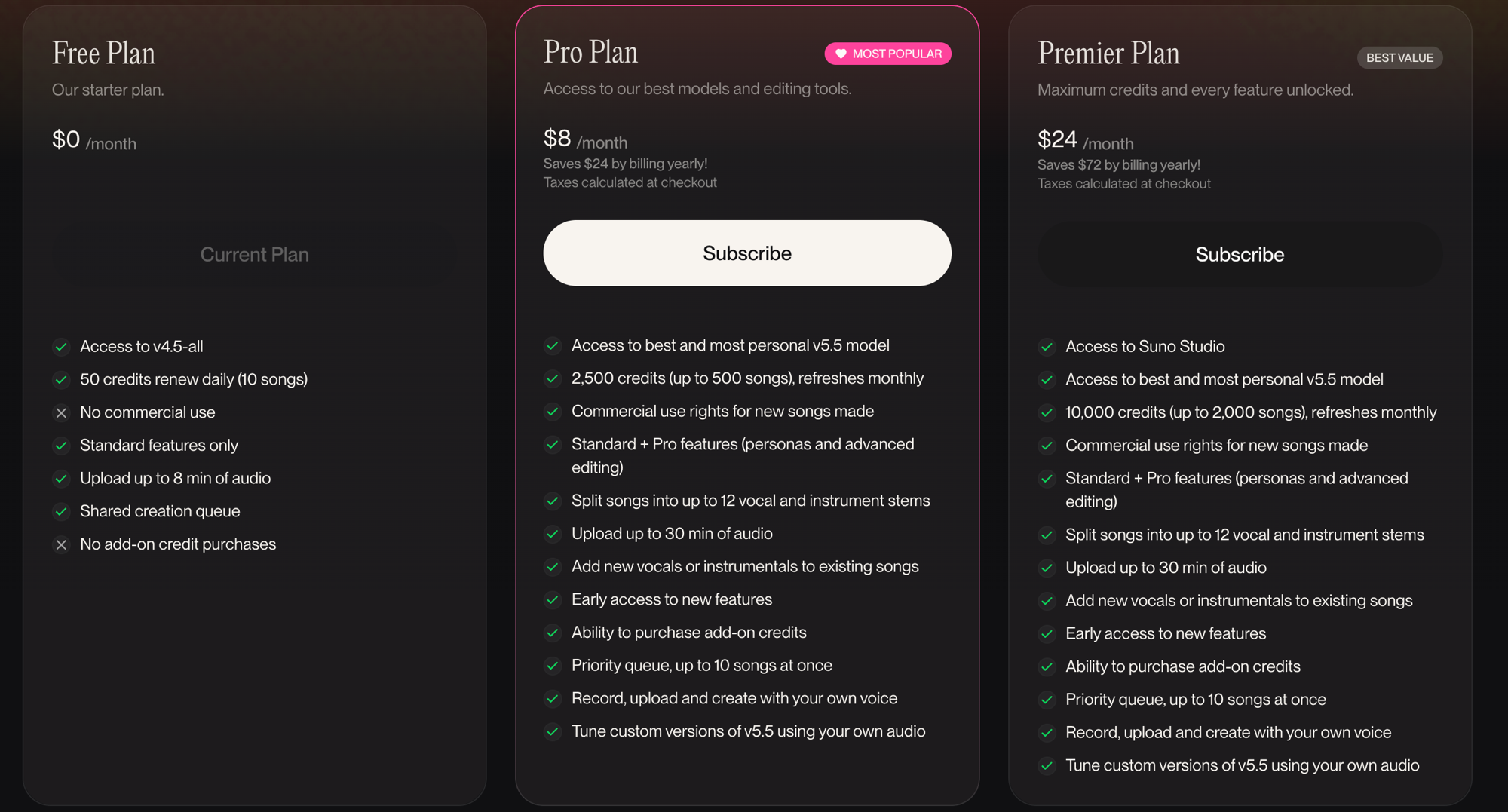
Suno Pro ($8/mo) and above add exactly four things over the free tier:
- Lossless WAV downloads — 16-bit / 44.1kHz WAV alongside MP3
- Explicit commercial use rights — the terms grant commercial use of generated tracks
- Priority queue — shorter wait times for generation
- Higher monthly credits — a large step up from the free allowance, depending on plan
How much each of those four is worth to your specific use depends entirely on the workflow you have. Each item gets its own section.
Lossless WAV vs. MP3 — Listening vs. DAW Work
WAV downloads are the Pro perk people bring up most often. How much WAV actually matters depends on what you're doing with the file.
Start with the format specs:
- MP3 (Suno free download) — roughly 128kbps lossy compression. About 3MB for a 3-minute track
- WAV (Suno Pro download) — 16-bit / 44.1kHz lossless PCM. About 32MB for a 3-minute track
For pure listening, the gap is small. Earbuds, Bluetooth speakers, car audio — at those listening points the difference between 128kbps MP3 and WAV barely registers. If listening is all you do, WAV is a nice-to-have, not a must.
For DAW work (Logic Pro, Ableton, FL Studio, REAPER), the story flips completely. MP3 has lopped off frequencies above 15kHz and carries quantization noise from the compression. Boost an EQ on that and you hear breakup and distortion. Compressors expose the lossy artifacts even more. WAV stays close to the original bit data, so EQ, compression, and reverb stack without compounding loss.
The clean cut: MP3 is fine for listening. WAV is effectively required for serious DAW work. Practical post-processing steps live in Post-Processing Suno Tracks in a DAW. For a deeper look at the formats themselves, Suno MP3 vs WAV covers that ground.
Licensing — The Free Tier's Gray Zone vs. Pro's Explicit Grant
The biggest gap in Suno's terms between free and paid is the explicit grant of commercial rights.
Free plan (terms as of the March 26, 2026 revision)
- Suno retains copyright in the generated track
- You get a personal, non-commercial use license
- Streaming platform release, ad BGM, and YouTube monetization are not permitted under the terms
- Using a track requires attribution credit to Suno
Pro / Premier plans (terms as of the March 26, 2026 revision)
- Suno assigns to you all of its right, title, and interest in the generated Output, and explicitly permits commercial use
- Streaming releases, brand and ad BGM, YouTube and TikTok monetization all permitted
- The terms don't guarantee that copyright actually vests in you, given the nature of machine learning
- The prohibition on imitating or cloning existing artists applies across every tier
The implication is direct. If you plan to release even one track commercially, the account that generated that track needs to be on Pro or higher at the moment of generation. Making a track on the free plan and then commercializing it later after upgrading sits in a gray zone under the terms.
One layer deeper on the legal side — the terms grant commercial use, but registering your own copyright in the track is a separate question. Since 2023, the U.S. Copyright Office has held that AI-generated portions without meaningful human authorship can't be registered. Korean copyright law leans the same direction. Writing the lyrics yourself or contributing clear creative work to the arrangement opens the door. For anything that matters legally, check the current terms directly and consult a lawyer when needed.
For anyone with commercial intent, the licensing item alone justifies the price. Framing it as "$8 a month to eliminate dispute risk" makes the math simple.
Priority Queue — Real Wait-Time Numbers
Priority processing is the Pro perk that's hardest to picture from marketing copy. Actual measurements make it tangible.
Numbers below are from weekday evenings in spring 2026 (U.S. Eastern peak hours).
| Plan | Average wait time per generation |
|---|---|
| Free | 30–90 seconds |
| Pro | 10–30 seconds |
| Premier | 5–15 seconds |
During peak hours (U.S. evening, Asia morning), the free queue grows longer. Right after a new model launches, traffic spikes push free queues past 3–5 minutes in some cases. Pro stays relatively stable even through those surges.
Shorter waits do more than save patience. The standard AI-music workflow is "generate 3–5 takes per prompt, then keep the best one." At five takes per finished track, the math works out to 150–450 seconds (2.5–7.5 minutes) of waiting on Free versus 25–75 seconds on Pro. Make five tracks a day and that's a daily total of 12–37 minutes on Free versus 2–6 minutes on Pro.
If you multitask while generations run, the gap matters less. If your workflow is "stay focused, A/B the takes back-to-back," priority processing is where you'll feel the upgrade most.
In my own workflow I'm firmly in the second camp — I run the same prompt several times and compare takes, so the waiting stacks up while I'm finishing a single track. Following the math above at five takes per track, the time spent purely waiting on the free queue climbed fast as the track count grew. Someone who steps away and does other things during generation would barely notice the same difference.
Pro ($8) — When It Breaks Even
Real scenarios where Pro pays for itself. Define "break-even" two ways.
Definition A — Per-track unit cost
At 2,500 credits per month producing roughly 500 tracks, the per-track cost on Pro is $0.016. Royalty-free music libraries (Epidemic Sound, Artlist, and similar) charge $5–$25 per track license. Generate even one usable, releasable track per month and the unit cost beats those licenses immediately.
Definition B — Time saved
Music composition freelance rates run $30–$80/hour. If you bill clients for music work, the priority queue saves roughly 1–3 minutes per track. At 100 tracks per month that's 100–300 minutes — $50–$240 in billable-hour equivalents. Five client projects in a month covers $8 several times over from time savings alone.
Clear-cut break-even scenarios:
- YouTube channel operators — Weekly videos using your own BGM, intros, and outros. Four videos a month at $20–$100 in saved licensing fees breaks even instantly
- Indie musicians prepping a commercial release — A single commercial release requires Pro or higher under the terms. The dispute-risk reduction alone justifies $8
- DAW learners post-processing tracks — WAV is effectively required. MP3 compounds losses through the post chain and slows learning
- Freelancers taking ad and content BGM work — Both unit cost and time savings tip Pro into the green
Less clear-cut scenarios:
- Personal listening and playlist enjoyment — MP3 handles this; Pro brings little extra value
- Casual users making 5 or fewer tracks a month — The free tier's 10 tracks per day already covers it
- Demos with no commercial intent — Neither licensing rights nor WAV matter much
If your pattern matches one of the clear break-even cases, Pro is an immediate net positive. If your situation sits in the unclear column, one more month on the free tier is a fine way to confirm your habits before upgrading.
$24 Premier — Who It's Actually For
Premier at $24/mo is three times the Pro price. What you actually get for the extra cost: more credits (2,500 → 10,000), more concurrent generations, Suno Studio access, and a slightly higher queue priority. WAV, licensing, and commercial use are identical to Pro.
Premier makes sense for these patterns:
- 500+ tracks per month — The point where Pro credits run out. Roughly 16+ tracks per day, production-line workflow
- A/B testing every track 5–10 times — High per-track iteration count, "must find the best take" mindset
- Multiple projects in parallel — Pro caps concurrent generations; Premier handles more and adds Suno Studio. Freelancers juggling multiple clients or multi-track sessions
- Commercial release as a primary income source — If music revenue clears $100/mo, the $24 fee disappears as a line item
Anyone making 5 tracks a month is clearly overpaying with Premier. The sensible path is Pro first, then upgrade if credits run out by the 25th of the month for two or three months running.
Premier at $24/mo provides 10,000 credits (around 2,000 tracks) plus Suno Studio, 12-stem separation, and every Pro feature as the top tier. It fits stock-music vendors building libraries or operators running dedicated AI-music content channels at scale.
Seven-Question Checklist Before You Pay
Run yourself through these seven questions before clicking subscribe.
- Will you have at least one commercial release, sponsored use, or monetized track this month?
- Do you take generated tracks into a DAW for EQ, compression, and mastering yourself?
- Are you generating 5+ tracks a week on average? (Free daily cap getting close)
- Do you regenerate the same prompt 3+ times to find the best take?
- Are peak-hour wait times (9 PM–1 AM KST) breaking your creative flow?
- Are you considering copyright registration on tracks where you wrote the lyrics or contributed arrangement?
- Do you have a streaming-platform upload planned in the next 3 months?
Three or more "yes" answers and Pro at $8/mo pays back immediately. Five or more "yes" answers with monthly generation approaching 500 tracks, and Premier at $24/mo makes sense. Just one or two yeses, and another month on Free to confirm your real usage pattern is the smarter call.
SunoDown helps Suno Pro subscribers batch-download their own playlists as lossless WAV or MP3. It's a tool for exercising the WAV right Pro grants you efficiently. Token setup is covered in the Suno Pro Cookie Setup guide. SunoDown is an independent service unaffiliated with Suno; it supports Pro subscribers exercising their legitimate download rights on their own creations.
What Happens to Your Tracks After You Cancel or Downgrade
Closing question that comes up often. Here's what happens to tracks you generated during a paid subscription after you cancel or downgrade.
Under Suno's terms (as of the March 26, 2026 revision), commercial use rights granted to tracks generated during Pro or Premier membership persist after cancellation. Tracks made during a Pro period stay commercially usable even after downgrading to Free. Tracks newly generated after cancellation, though, fall back under the Free terms (non-commercial, with attribution required).
WAV download rights work similarly. Tracks generated during a paid subscription remain WAV-downloadable after cancellation, as long as they stay accessible in the service. That said, Suno's terms don't rule out future policy changes that could limit retention windows. For tracks that matter, downloading the WAV to your own device while the subscription is active is the safe move.
Downgrading (Premier → Pro) reduces credit limits but doesn't touch the underlying rights. Pro → Free downgrades change the licensing on newly generated tracks to non-commercial.
The summary: rights granted on tracks generated during any Pro-or-higher period survive cancellation. The "subscribe one month, produce a batch, cancel" pattern isn't blocked by the terms. If you generate tracks monthly, staying subscribed is cleaner so every new track carries the same rights.
This piece is based on Suno's terms, pricing, and policy as of the March 26, 2026 revision. Both terms and pricing change; verifying current details on Suno's official pages right before payment is the safe habit. WAV retention policies, priority queue sizing, and credit consumption tied to new model launches tend to get quietly tuned each quarter, so following the change notes for whichever feature you depend on is worth the small effort.
The break-even calculation lives or dies on your actual usage pattern. For someone making one track a week to share with a friend, Premier is clearly overspending. For a YouTuber adding fresh BGM to every weekly upload, Pro pays back instantly. The pricing page's marketing copy is less informative than your own logs — how many tracks you actually made last month and where they're headed next is the most accurate guide to whether the upgrade is worth it.
Ready to try it?
Open SunoDown →