Suno vs Udio 2026: Which AI Music Service Should You Pick?
Suno and Udio look similar but differ in vocals, mix, length, pricing, and rights. A 6-axis comparison with scenario-based recommendations.
The 6-Axis Verdict at a Glance
Suno and Udio both synthesize lyrics, vocals, and instrumental backing from a single text prompt. On the surface they look like the same tool wearing different paint. Generate a few tracks, though, and the gaps show up fast. Neither wins every scenario. This piece compares the two services across six axes and maps each use case to the better fit.
Here's the one-line summary first. Pricing and policy reflect what's live as of the March 26, 2026 revision.
| Axis | Suno (v4.5) | Udio (v1.5) |
|---|---|---|
| Vocal synthesis | Very strong at lyric-driven vocals | Refined tone and texture |
| Mix tone | Clean for pop, EDM, K-pop | Strong for jazz, R&B, experimental |
| Track length | Up to 4 min per generation, unlimited Extend | Up to 2 min 15 sec, Extend supported |
| Entry price (paid) | Pro at $8/mo | Standard at $10/mo |
| Rights | Pro tier grants explicit commercial use | Standard tier grants explicit commercial use |
| Workflow | Custom Mode with rich meta tags | Precise Extend and inpainting |
The table alone makes the point — the right pick depends on genre and the kind of content you're making. Each axis gets the long version below.
In my own workflow, switching between the two lands exactly where the table says it should: neither one wins every scenario. Run the same lyrics through both and one side feels stronger on vocals and length while the other feels stronger on mix tone and genre breadth, so which service I reach for ends up depending on the track. That's why this comparison splits the strengths axis by axis instead of crowning a single winner.
Vocals — Lyric Clarity in Suno vs. Tonal Detail in Udio
The two services take different routes to vocal synthesis. Suno leans hard into pronouncing the lyrics you type as actual, intelligible words. Pronunciation stays consistent across multilingual input, including Korean. For lyric-driven content — karaoke-style demos, Korean pop, English R&B, anything where listeners need to catch the words — Suno has the edge.
Udio pulls in another direction. Instead of word-level clarity, it nails the tone, texture, and phrasing of a vocal performance. The breath control on a jazz vocal, the melisma in R&B, the rasp on a rock take — those sonic qualities land more naturally. The trade-off is that lyrics smudge more often, and the synthesized words occasionally drift from what you typed.
Both services handle English best, with Korean, Japanese, and Spanish trailing behind. If Korean lyrics are central to your project, Suno's synthesis is more reliable today. For rules on writing the lyrics themselves, see the Suno Lyrics Prompting guide.
Mix and Master Tone
Each service has a distinct default tone — what the track sounds like before you touch it in a DAW.
Suno v4.5 lands a clean, loud mix. Low end is trimmed sensibly, vocals sit center and forward, and loudness stays consistent across generations. Pop, EDM, K-pop, synthwave — anything radio-friendly comes out ready to play. You can often skip post-processing entirely.
Udio v1.5 ships something closer to a raw recording. Low end is fuller, vocals carry more natural reverb and delay, and the mix has dimension. Jazz, R&B, ambient, experimental electronic — anything that depends on spatial depth — sounds better out of the gate. Matching streaming loudness targets (Spotify's -14 LUFS) takes a bit more work afterward.
Both services hand you a finished master, but if a platform release is the goal, a quick DAW pass still pays off. Post-processing gets its own write-up.
Track Length and Structural Control
Length control diverges too.
Suno generates up to roughly 4 minutes in one shot. With Extend, you stack additional sections at the end and effectively get unlimited length. Custom Mode lets you drop [Verse], [Chorus], and [Bridge] tags inside the lyrics to direct structure. If you plan the song shape up front, Suno fits that workflow.
Udio generates about 2 minutes 15 seconds per shot — shorter chunks that you assemble. The trade-off is two-way Extend (forward and backward) plus more precise inpainting that regenerates a specific section in the middle of an existing track. When you want to redo just one passage without losing the rest, Udio's precision wins.
The short version: Suno does "longer one-shot with meta tags for structure"; Udio does "short chunks with surgical inpainting." Which one matches your workflow becomes obvious after three or four tracks each.
Pricing and Generation Volume
Pricing structures differ. Numbers below reflect the March 26, 2026 revision.
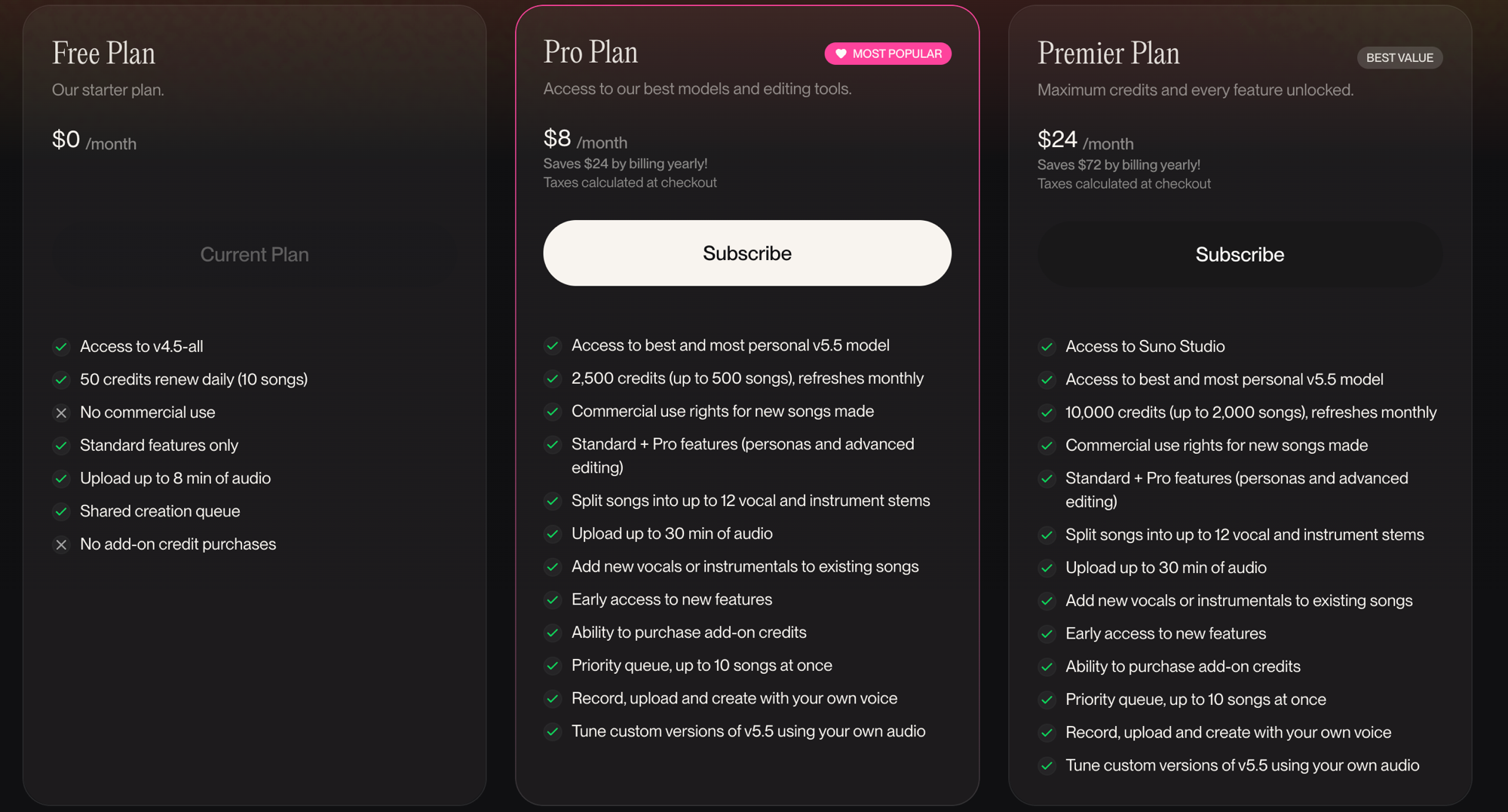
Suno
- Free — 50 credits/day (about 10 tracks), non-commercial
- Pro — $8/mo, 2,500 credits/mo (about 500 tracks), priority queue, commercial use
- Premier — $24/mo, 10,000 credits/mo (about 2,000 tracks), Suno Studio, commercial use
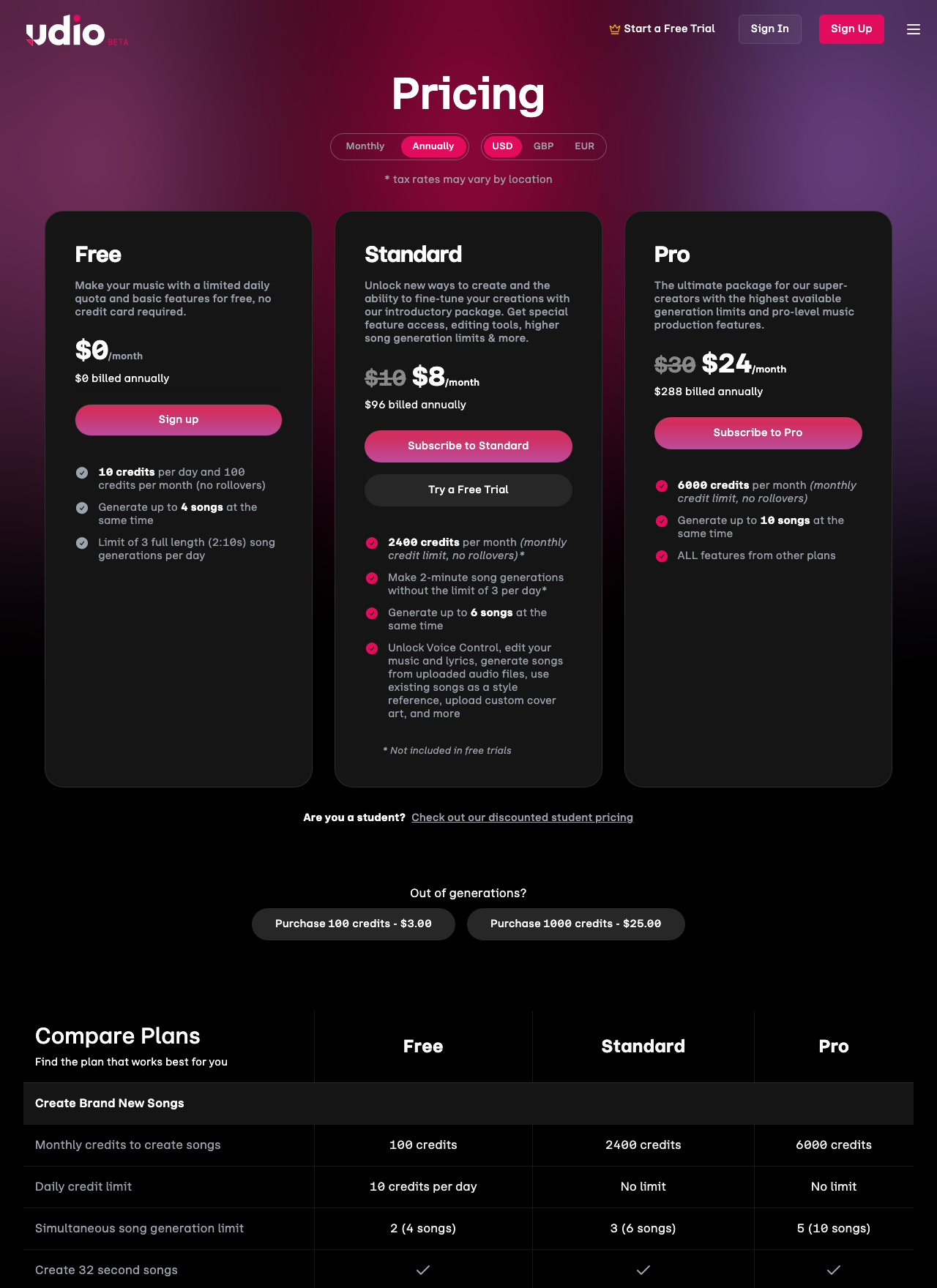
Udio
- Free — 100 credits/mo (about 25 tracks), non-commercial
- Standard — $10/mo, 1,200 credits/mo (about 300 tracks), commercial use
- Pro — $30/mo, 4,800 credits/mo (about 1,200 tracks)
On raw credit cost, Suno Pro ($8 for 2,500 credits) is the cheapest paid entry point. Udio Standard ($10 for 1,200 credits) has a higher per-credit price, but Udio also burns fewer credits per finished track, which narrows the real-world gap.
If you crank out lots of tracks fast, Suno Pro stretches further. If you spend more time per track and lean on regeneration, Udio Standard balances out. The Suno plan-by-plan breakdown lives in Is Suno Pro Worth It?.
Rights and Commercial Use
Both services grant commercial use on paid tiers, but the fine print differs.
Suno (terms as of the March 26, 2026 revision)
- Free — personal, non-commercial use only, with attribution credit to Suno required. Suno retains copyright in the generated track and grants you a usage license
- Pro and above — explicit commercial rights to the tracks you generate. Streaming platform release, ad placement, and YouTube monetization are all permitted
Udio (terms as of the March 26, 2026 revision)
- Free — personal, non-commercial use
- Standard and above — commercial rights granted, with a recommendation (not a hard requirement) to label content as AI-generated
Both terms prohibit attempts to clone or impersonate existing artists. Putting a specific artist name in the prompt to mimic their voice violates both services' rules.
A more important legal note: since 2023, the U.S. Copyright Office has held that AI-generated portions of a work cannot be registered without meaningful human authorship. Korean copyright law leans the same way. So even when the terms grant commercial use, registering your own copyright in the track is a separate question. Real human authorship in the lyrics or arrangement is what opens the door. For anything serious, check each service's terms directly and consult a lawyer when needed.
Workflow — Lyrics, Style, and Extend
Day-to-day workflow also feels different.
Suno Custom Mode splits lyrics and style into two input fields. Inside the lyrics, you place meta tags like [Verse] and [Chorus] to dictate structure. In the style field, you list genre, instruments, BPM, and mood descriptors. The meta tag vocabulary is rich, so granular structural control is on the table. Composing a 4-minute track in one pass fits this pattern naturally.
Udio defaults to one combined input for lyrics and style descriptors. You start with a 2:15 chunk, then use Extend to push the track forward or backward, and inpainting to regenerate sections in the middle. The shorter unit means more iterations per finished track, but the per-section control is unusually precise. Producers with traditional DAW instincts — "I just want to redo that one bar" — feel at home here.
For newcomers, Suno's Custom Mode plus meta tags has a gentler learning curve. Once you've gained some experience, Udio's inpainting becomes a compelling option for detail work.
Scenario-Based Recommendations
A map of which service tends to win in common situations. Not absolute — your genre and ear can flip the call.
YouTube BGM and Shorts background — Suno
- Clean tone, consistent loudness, and 10 free tracks a day usually covers it
- Instrumental BGM without lyrics generates quickly in Suno
Personal demos and writing practice — Suno or Udio
- Korean and English lyric demos: Suno
- Tonal experiments and texture work: Udio
- Honestly, running both free tiers in parallel and comparing your own results is the most reliable way to choose
Streaming releases (Spotify, Apple Music) — depends on genre
- K-pop, pop, EDM releases: Suno Pro or higher
- Jazz, R&B, ambient releases: Udio Standard or higher
- Either way, a DAW pass (EQ, compression, mastering) before release is nearly mandatory
Live performance backing tracks — Suno
- Rich structural meta tags make it easy to shape intros and outros for stage flow
- Extend handles bespoke intro and outro lengths well
Ads and brand BGM — depends on length
- 30-second ads: Udio fits in one generation (under 2:15)
- 60 seconds and up: Suno is easier in one shot
- Either way, commercial use requires a paid plan
Tracks needing surgical edits and partial regeneration — Udio
- Redoing just a 16-bar intro is dramatically more efficient with Udio's inpainting
Tracks you want to register under your own copyright — both services have limits
- Lyrics and arrangement contributed by you open the door to registration
- AI-only portions can't be registered as your work in either the U.S. or Korea
A Hybrid Workflow That Uses Both
There's no rule that says you have to pick one. Running both free tiers in parallel and routing each track to whichever service fits better is the most pragmatic setup.
Common hybrid patterns:
- Build the song in Suno, polish details in Udio — Use Suno's lyric synthesis for the main track, then layer in shorter intros or fills generated in Udio with its tighter inpainting
- Generate Plan A in Suno and Plan B in Udio at the same time — Run the same lyrics and concept through both, then keep the version that wins your ear. Free tiers on both sides keep the cost at zero
- Develop tone in Udio, then move to Suno for lyric synthesis — Sketch the instrumentation and mood in Udio first, port the style descriptors to Suno, and let Suno handle the vocal pass
- Stitch tracks together in a DAW — Pull WAVs and MP3s from both services into a DAW, keep Suno's vocal stem and pair it with Udio's instrumental, or vice versa
For serious commercial work, subscribe to one paid plan and keep the other as a free auxiliary tool. Pick the paid one based on the genre you ship most often.
SunoDown supports batch lossless WAV and MP3 downloads for Suno playlists, which helps when you're moving Suno tracks into a DAW. Udio tracks can be downloaded through Udio's own interface.
One last caveat — this reflects the March 26, 2026 revision. Both services iterate models quickly, and the strengths and weaknesses shift on roughly six-month cycles. Suno's Korean pronunciation improved dramatically from v3 in 2024 to v4.5 in 2026, and Udio's vocal naturalness took a clear step up from v1.0 to v1.5. If you're serious about AI music as a tool, re-running this comparison on the latest builds every six months is worth the small effort.
Picking between the two is really a tooling decision for your own creative workflow. Whichever service you settle on, tracks you generated from your own prompt and lyric are fair game for personal listening, DAW post-processing, and your portfolio. Both services grant explicit commercial rights on their paid tiers, so Suno Pro and Udio Standard both give you a clean license to back up, release, or monetize the songs you created. Taking someone else's generation and redistributing or selling it is a separate matter — it needs its own agreement under both services' terms, and nothing on the comparison table changes that. The point of the comparison is to choose the tool that fits your own work, not to find a shortcut around other creators' rights.
The comparison itself isn't a heavy lift. Four lines of lyrics and one line of style descriptor, run through both services, takes about five minutes per round. Whichever sounds better in your headphones is the answer that matters. Tables and numbers set the starting line; the actual choice gets made by your ears.
Ready to try it?
Open SunoDown →